
We offer school licenses for our non-subscription courses and products.
Buy School Licenses:
- The Buy School Licenses button will allow you purchase licenses quickly and easily with all major credit cards.
- After selecting the Buy School Licenses button:
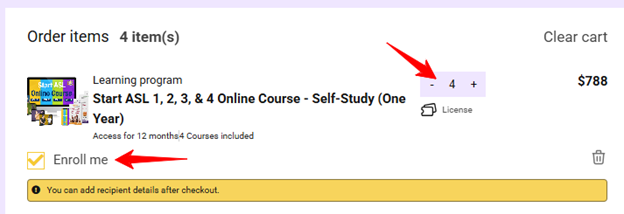
- Enter the quantity of licenses you want to purchase,
- And check the "Enroll me" box if you would like to be enrolled into the course yourself as one of the licenses.
- Complete checkout.
Assign School Licenses:
- Visit your Account page (https://learn.startasl.com/account) and click Licenses > Assign licenses.
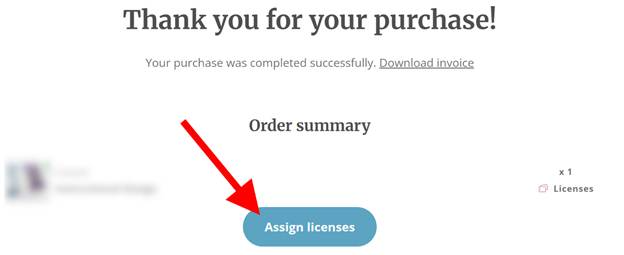
- Or, once the transaction is complete, on the thank you page, you will see an "Assign licenses" button, which will allow you to distribute the licenses. Clicking the button will redirect you to your account page, where a pop-up window appears.
- From there, you can:
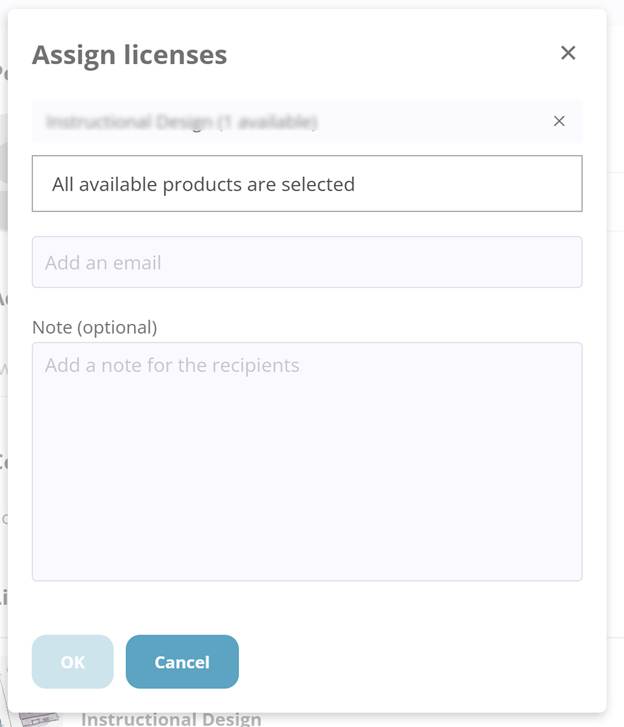
- Select which course you would like to share the license of.
- Enter the email addresses of the people you want to invite to use the licences, and press Enter.
- Optionally write a personal message.
- Click ok to distribute the license(s)
- If you don’t want to send invitations immediately, you can return later to your account page and click assign licenses to share your licenses anytime.
- Once access is shared, each recipient will receive a notification email with instructions on how to access the product.
- If a course included in a license is a One Year Access course, the countdown will begin once the user is enrolled in both the license and the course.