
New Online Course Students (signed up after April 2026)
How are assignments graded?
All of the course quizzes and activities are automatically graded by the Start ASL system.
For Guided students, all submission and essay assignments are graded manually by our instructors. These assignments include Deaf Event papers, Research papers, and Video Submission Assignments.
For Self-Study students, no assignments are manually graded by our instructions, but Research Papers are manually reviewed for inclusion on our site.
How do I submit video assignments?
View this help article: https://helpdesk.startasl.com/support/solutions/articles/9000160574-how-do-i-submit-video-assignments-
How long does it take for submission assignments to be graded?
For Guided students, Online Course submission assignments are usually graded within 10 business days. Please be sure to submit any manually graded assignments at least 14 days before your subscription expires to allow time for grading. These assignments include Deaf Event papers, Research papers, and Video Submission Assignments. Keep in mind that if you do not receive a passing grade on your assignment, you will also need enough time to resubmit your assignment in order to receive your completion certificate.
Keep in mind that you can continue to move through the course while your assignment is in the process of being graded - just move on to the next lesson.
Note: Manual instructor grading and feedback is not included in Self-Study course options.
How do I view the instructor feedback on my assignments?
If you are a Guided Online Course student and have submitted an Expression Video Assignment (or other manually graded assignment), but the assignment is not showing as completed, please follow these steps:
- Log into your account: https://login.startasl.com
- Visit your Student Dashboard under "Assignment Submissions" to view your submission status and view feedback.
- You can also check your Message Inbox to see if you have received any assignment graded notifications: https://learn.startasl.com/inbox (If so, click the link in the message.)
- You can also visit the assignment in your course to see if it has been graded. You will see a grade and a button to view your feedback.
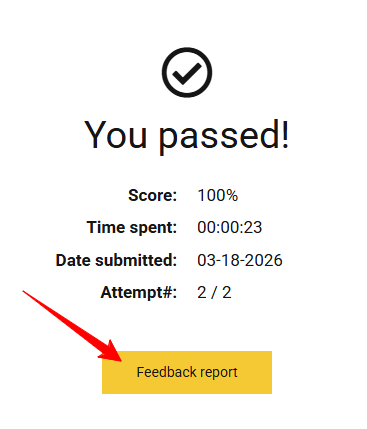
- If your assignment has not been graded, and it has been at least 10 business days since you have submitted your assignment, please open a support ticket so we can help.
Note: Manual instructor grading and feedback is not included in Self-Study course options.
Legacy Online Course Students (signed up prior to April 2026)
How are the assignments graded?
All of the course quizzes and activities are automatically graded by the Start ASL system.
All submission and essay assignments are graded manually by our instructors. These assignments include Deaf Event papers, Research papers, and Video Submission Assignments. With the Silver level, students receive written feedback on their video submission assignments. With the Gold level, students receive video feedback on their video submission assignments as well as any extra documentation that may be required by their school in order to receive credit.
Your final grade will be calculated on your completion certificate.
How do I submit video assignments?
View this help article: https://helpdesk.startasl.com/support/solutions/articles/9000160574-how-do-i-submit-video-assignments-
How long does it take for submission assignments to be graded?
Online Course submission assignments are usually graded within 5 business days. Please be sure to submit any manually graded assignments at least 10 days before your subscription expires to allow time for grading. These assignments include Deaf Event papers, Research papers, and Video Submission Assignments. Keep in mind that if you do not receive a passing grade on your assignment, you will also need enough time to resubmit your assignment in order to receive your completion certificate.
Keep in mind that you can continue to move through the course while your assignment is in the process of being graded - just move on to the next lesson.
How do I view the instructor feedback on my assignments?
You will know that feedback has been left on your signing assignment if you have received a grade on that assignment.
- First, make sure you are logged in.
- Then visit your Gradebook for that course: https://courses.startasl.com/grade/report/overview/
- Look in the Video Submissions section to see if there has been a grade left on your signing assignment.
- If there is a grade, click on the assignment to be taken to the assignment page to review your feedback.